AI shoppers couldn’t finish 5 of your 10 tasks.
Each one is a sale an assistant would take to another store. Start with the first fix below.
0/10
completed
- Lost sales
- 4
- Lost sometimes
- 1
- Completed
- 5
Where the first sale was lost
First-order discount: “Does this store offer a discount on a first order? If there is a code, add the Hand-thrown Stoneware Mug to the cart and check whether the code works. Don't buy anything.”
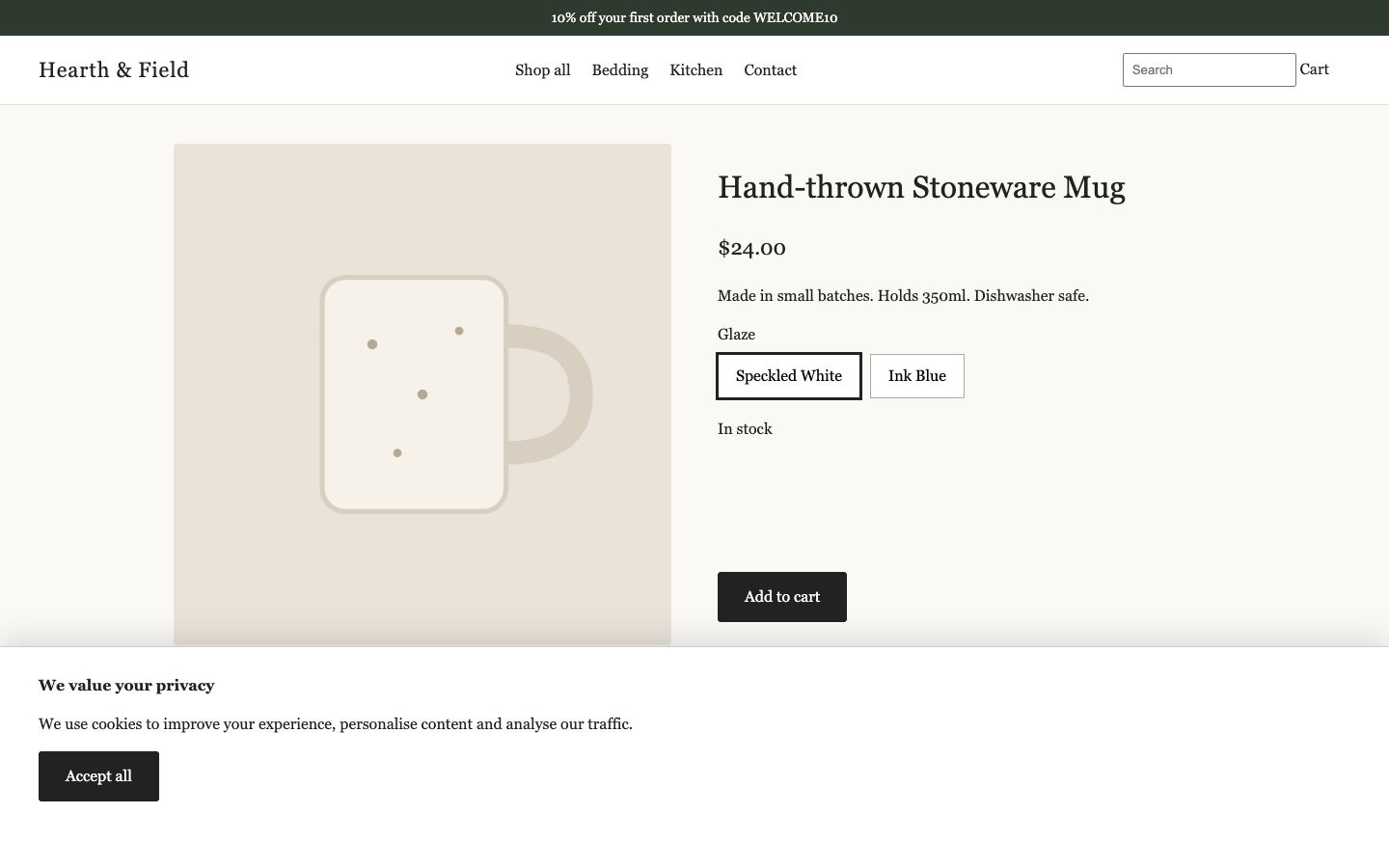
1. Opened the mug
The replay starts when it comes into view.
- Step 1: Opened the mug
- Step 2: Closed the cookie banner
- Step 3: Added the mug to the cart
- Step 4: Typed WELCOME10
- Step 5: Pressed Apply. "Something went wrong"
- Step 6: Pressed Apply again. Same error
- The sale was lost here. Fix the discount box so WELCOME10 works, or take the banner down until it does.
What to fix
In order. The first one stopped the most tasks.
- 1Fix firstSomething brokeAffects first-order discount
Fix the discount box so WELCOME10 works, or take the banner down until it does.
Your banner offers 10% off with WELCOME10. In the cart, Apply shows "Something went wrong" every time, so a shopper who came for the deal leaves without it.
- 2No answerAffects delivery date and cost
Say how long delivery takes and what it costs.
The shipping policy says delivery times vary and asks people to get in touch. An AI assistant can’t promise a date, so it suggests a store that gives one. Put the times and costs on the policy page and under the price on product pages.
- 3Couldn’t find itAffects choose and add to cart
Keep the cookie banner off the Add to cart button.
The banner is 230 pixels tall and sits over the bottom of the product page, where Add to cart is. Make it smaller, or move it to a corner.
- 4Couldn’t find itAffects search
Make search match part of a product name.
Search only finds a product when the whole name is typed. "mug" finds nothing, although you sell the Hand-thrown Stoneware Mug.
- 5Something brokeAffects size and fit advice
Point the Size guide link at a real size guide.
The link on the duvet cover page does nothing when clicked. Link it to a size guide page, or show the measurements on the product page.
Next steps
Fixed something? Check it free.
We run the same 10 tasks again. Free until Nov 13, 2026.
Hear the day it breaks again.
We re-run these 10 tasks every Monday through the holidays and email you only if something gets worse. $99 a month. Cancel anytime.
Start Agent WatchThe details
Every task, the buyer’s questions, the checkout and more.
- 01Completed
Find a product
The shopper found a duvet cover and its price from the Bedding menu. - 02Lost sale
Search
Couldn’t find it. Search found nothing for "stoneware mug" or "mug", although the store sells a stoneware mug. - 03Completed
Check stock
The shopper picked size King in Sage and read "In stock" at $139. - 04Lost sometimes
Choose and add to cart
Couldn’t find it. It worked once. On the other run the cookie banner covered Add to cart and the shopper gave up.In the way: a cookie banner - 05Lost sale
Size and fit advice
Something broke. The Size guide link does nothing when clicked, so there was no fit advice to read. - 06Lost sale
Delivery date and cost
No answer. The shipping policy says delivery times vary and gives no dates or costs. - 07Completed
Returns
The shopper found the returns rules on the refund policy page. - 08Lost sale
First-order discount
Something broke. The banner offers WELCOME10, but Apply shows "Something went wrong" every time. - 09Completed
Contact the store
The shopper found the store’s email and its promised reply time. - 10Completed
Get to checkout
The shopper added the mug and reached the checkout, where every trip stops.
We asked each question on every route an AI assistant uses. “Answered” means a full answer is where assistants look first.
!What a shopper meets first. Within seconds on a product page, a cookie banner covered the page, including Add to cart. An assistant can usually close it, so this is friction we saw, not a lost sale we proved.
“If I order today, when will it arrive in Austin, Texas 78701, and how much is delivery?”Missing
- Product page · Read before its scripts run.Nothing
- Shipping policy pageNothing
- FAQ, help and contact pagesNothing
- Product data for search enginesNothing
- Your store’s own AI agent connection, asked plainlyDoesn’t answer
- The same connection, asked for the policy by nameDoesn’t answer
What to change. Say how long delivery takes and what it costs where assistants look first. Write both in your shipping policy (Shopify admin, Settings, Policies). Add the same answer to your FAQ, and show a delivery estimate on product pages, through your theme or a delivery-date app. If you use Google Merchant Center, set shipping times there too, because Google uses those settings before your page.
“If it doesn’t suit me, can I return it, how long do I have, and who pays for sending it back?”Buried
- Product page · Read before its scripts run.Nothing
- Return policy page“Refund policy You can return unused items within 30 days of delivery for a full”Full answer
- FAQ, help and contact pagesNothing
- Product data for search enginesNothing
- Your store’s own AI agent connection, asked plainlyDoesn’t answer
- The same connection, asked for the policy by nameDoesn’t answer
What to change. State the return window and who pays for return shipping where assistants look first. Put both in your return and refund policy (Shopify admin, Settings, Policies) and in your return rules (Settings, Returns). A short line on product pages, such as "Free returns within 30 days", answers it before a shopper has to ask.
“How can I contact the store, and how quickly do they reply?”Answered
- Product page · Read before its scripts run.Nothing
- Contact information policy · Your store has no such policy page.Nothing
- FAQ, help and contact pages“and we will reply within two business days. Shipping · Returns · Contact”Full answer
- Your store’s own AI agent connection, asked plainlyDoesn’t answer
- The same connection, asked for the policy by nameDoesn’t answer
“Is there a discount on a first order, and how do I get it?”The code is on the page
- Product page · Read before its scripts run.“Linen Duvet Cover · Hearth & Field 10% off your first order with code WELCOME10 Hearth & Field Shop all Bedding”Full answer
- Home page“Home · Hearth & Field 10% off your first order with code WELCOME10 Hearth & Field Shop all Bedding”Full answer
- FAQ, help and contact pages“Contact · Hearth & Field 10% off your first order with code WELCOME10 Hearth & Field Shop all Bedding”Full answer
- Your store’s own AI agent connection, asked plainlyDoesn’t answer
Read-only, without a browser, so delivery dates that apps add after a page loads aren’t counted here; the shopping trips above see them. The delivery question names Austin, Texas 78701. “Answered” means a full answer is where assistants look first; “buried” means it exists, but an assistant has to dig for it; “partial” means only part of it is anywhere we checked.
- The itemsShown
- The totalUSD $24.00
- Shipping costOnly after an address is typed
- Delivery dateOnly after an address is typed
- Checking out as a guestPossible
What to do. An assistant usually tells its person the full price and the delivery date before asking for a yes. Your checkout shows them only once an address is typed. Put your shipping cost and delivery time on product and cart pages too, so an assistant can say them earlier.
Read from your checkout page without typing anything. Sales tax isn’t counted, because US checkouts usually add it once an address is in.
Routes made for AI agents
Shopify turns these on for every store. A custom robots.txt or a security setting can quietly shut them.
- Instructions for AI agents (agents.md)/agents.md · Not served.
- Instructions for AI agents (llms.txt)/llms.txt · Not served.
- Store profile for Google’s checkout protocol (UCP)/.well-known/ucp · Not published.
- Shopping connection for agents (UCP)/api/ucp/mcp · Doesn’t answer.
- Policy and FAQ connection for agents/api/mcp · Doesn’t answer.
- robots.txt tells GPTBot to stay out of the whole store.
Check these in your own admin
We can’t see these from outside your store.
- 1Decide which AI channels can sell directlyIn your Shopify admin, open Sales channels, then Agentic. Google began switching on checkout inside AI Mode and Gemini for eligible Shopify stores in September 2026, so check what is on and whether you want it.
- 2Check that an AI-built cart charges every feeIf you use an app that adds fees (shipping protection, handling, hazmat), add a product to the cart, then open yourstore.com/cart.js. If the fee isn’t in that total, an order an agent builds may skip it.
- 3Freeze before the rushMost stores stop changing their site about a week before Black Friday (27 November 2026). Make answer and pop-up fixes before your own freeze date, then re-check.
- An AI shopper using a real browser, standing in for assistants such as ChatGPT, Gemini and Perplexity.
- A first-time guest. It never signed in, sent a form or paid, and every trip stopped at checkout.
- Where it ran: Our own test store, on our own computer.
- Each task ran 2 times. “Lost sometimes” means it worked once and failed once.
- Platform: Shopify. Google’s checkout protocol (UCP): not found. Your robots.txt tells these AI crawlers to stay out: GPTBot.
- Pages made for AI agents: an llms.txt file was not found, and Shopify’s agent connection didn’t answer.
- Your product pages carry standard product data for search engines and AI answers, but without shipping, returns.
- 1.Find a product. “I'm looking for a duvet cover. Find a good option in this store and tell me its name and price.”
- 2.Search. “Use the store's own search to find "stoneware mug", then open the most relevant product and tell me its name.”
- 3.Check stock. “Is the Stonewashed Linen Duvet Cover available in size Single, color Oat? Find out without buying anything.”
- 4.Choose and add to cart. “Add the Stonewashed Linen Duvet Cover in size Single, color Oat to the cart, then confirm it is in the cart.”
- 5.Size and fit advice. “Which size of the Stonewashed Linen Duvet Cover should I choose? Find the size guide or fit advice on the store.”
- 6.Delivery date and cost. “I live in Austin, Texas 78701. If I order the Hand-thrown Stoneware Mug today, when will it arrive and how much will delivery cost?”
- 7.Returns. “If the Stonewashed Linen Duvet Cover doesn't suit me, can I return it? How long do I have, and who pays for sending it back?”
- 8.First-order discount. “Does this store offer a discount on a first order? If there is a code, add the Hand-thrown Stoneware Mug to the cart and check whether the code works. Don't buy anything.”
- 9.Contact the store. “How can I contact this store about an order, and how quickly do they say they reply?”
- 10.Get to checkout. “Buy the Hand-thrown Stoneware Mug in glaze Speckled White: add it to the cart and go to checkout as a guest. Stop as soon as you reach the checkout.”
Report sent Oct 30. Screenshots are kept for 90 days.